INTEGRATION
UniFi Captive Portal
Integration
UniFi brings a guest network up quickly. Its built-in landing page does not carry your brand or identify the guest. Useroam adds that layer on top of UniFi's external portal support — nothing in your network changes.
What the UniFi integration does
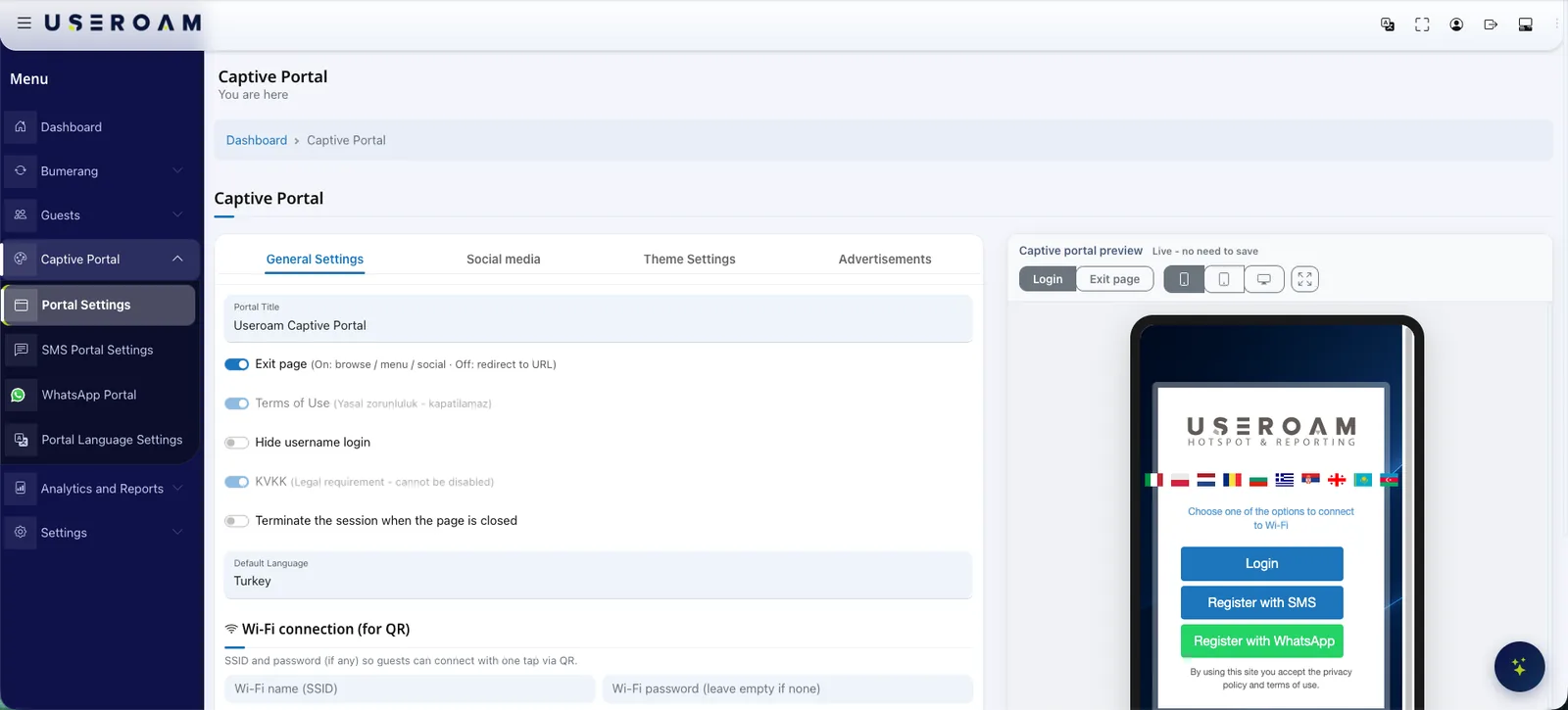
Useroam Cloud takes the guest joining your UniFi guest network, presents a captive portal carrying your brand and verifies their identity. On the UniFi side the guest network is switched to Hotspot (Captive Portal) mode and its landing-page authentication is pointed at Useroam as the external portal server, with the Useroam address allowed before login, plus the WhatsApp addresses where WhatsApp sign-in is used. Guests sign in with a one-time code over SMS or WhatsApp, a voucher, a room number and surname in hotels, or a username and password. Once verified, Useroam authorises the guest through the UniFi Network API, and the session duration, data quota and speed limit are applied in the same call; a session that runs out of time or quota is closed on the controller. The flow needs no RADIUS — registering controller access in the panel (an API key with the console ID, or a local controller address) is enough. The active-guest list, a breakdown by sign-in method and usage reports all live in the same panel, and every guest who connects becomes permissioned data for the Bumerang campaign, survey and QR menu modules.
How the integration works
External portal
The UniFi guest network is switched to Hotspot (Captive Portal) mode and its landing-page authentication is pointed at Useroam as the external portal server.
Portal and walled garden
A branded welcome page is designed in Useroam Cloud; the portal and verification services are added to the walled garden so they stay reachable before login.
Authorisation over the UniFi Network API
The guest verifies their identity over SMS or WhatsApp; Useroam authorises them through the UniFi Network API, applying session duration, data quota and speed limit in the same call. No RADIUS deployment is required.
Session management and reporting
Open sessions are tracked by Useroam, and a guest who runs out of time or quota is closed on the controller. The active-guest list, sign-in method breakdown and usage reports are read from the panel.
The welcome screen carries your brand
The captive portal is designed in the panel with your logo, colours and background image, and published with a live per-device preview. The same screen doubles as a placement for your campaigns and announcements.
What to know on the UniFi side
- Requires a UniFi Network controller with external portal server support; the guest network must be in Hotspot (Captive Portal) mode.
- Because authorisation runs over the UniFi Network API rather than RADIUS, controller access is registered in the panel: an API key with the console ID, or a local controller reachable over https with a valid certificate.
- HTTPS redirection, encrypted URL and secure portal options are left off on the guest network, and the Useroam address is allowed before login, together with the WhatsApp addresses where WhatsApp sign-in is used.
- Collecting and signing access records is not part of this integration; where log retention is required it is configured on the firewall handling internet egress.
A marketing layer on the same network
The UniFi integration does not just get guests online: every guest who connects becomes permissioned data. The Bumerang modules run from the same panel, with no additional deployment.
Campaigns
Welcome and win-back flows go out automatically over WhatsApp/SMS, and the return visit is measured in the panel.
Surveys
Happy guests are routed to a Google review, unhappy feedback comes to you — your reputation is fed by the WiFi.
QR Menu
Multilingual menu and order-from-table, with reporting on which item drew interest and when.
Other integrations
Useroam is vendor-agnostic: even when sites run different devices, everything is managed from one panel.
Your hardware is ready. Let's open the guest network.
Send us your model and we will plan the integration steps together and open a demo environment the same day.
Frequently asked questions
Do I need extra hardware for UniFi guest WiFi?
Do I have to set up RADIUS on UniFi?
Does the UniFi integration include access logging?
Related guides
Firewall Guest WiFi Integrations: Sophos, FortiGate & More
A brand-by-brand look at how guest WiFi authentication and logging integrate with Sophos, FortiGate, Palo Alto, Zyxel and MikroTik — and how to choose.
What Is a Captive Portal and How Does It Work?
The captive portal is the sign-in screen guests see when they join your WiFi. Here is how it works, what it does for your business and why cloud-based portals win.